
Magnetic Cable Clips for Desk: 6 Best Solutions Tested 2026
We analyzed 8,000+ reviews to find the best magnetic cable clips for desks. Compare adhesive-backed vs metal-mount clips for cable management.
Affiliate Disclosure:As an Amazon Associate, we earn from qualifying purchases.
Affiliate Disclosure: This site contains affiliate links. If you purchase through these links, we may earn a commission at no additional cost to you.
Magnetic cable clips let you secure charging cables and cords without permanent mounting. Unlike traditional adhesive clips, you can remove and reposition magnetic versions in seconds. We analyzed over 8,000 reviews to find which magnetic clips actually work on wood desks, metal standing desks, and monitor backs.
| Feature | Top Pick JOYROOM 9-Pack Magnetic Clips | VIVO 14 in. Magnetic Channel | 10-Pack Magnetic Cord Clips | Chfeila 4-Pack Rotating Clips |
|---|---|---|---|---|
| Price | $9.33 | $14.99 | $4.19 | $12.99 |
| Rating | 9.2 | 8.8 | 9.2 | 9.2 |
| Mount Type | Adhesive | Magnetic | Adhesive | Adhesive |
| Slots | 1 slot | Channel | 1 slot | 2 slots |
| Max Cable | 4mm | Multiple | 3mm | 4mm |
| Check Current Price | Check Current Price | Check Current Price | Check Current Price |
How magnetic cable clips work differently
Standard cable clips use adhesive only. Magnetic clips combine adhesive backing (to stick to your desk) with a magnetic top (to hold cables). The cable sits in a groove, held by magnetic force instead of being clipped or snapped in place.
This means you can pull cables out to disconnect devices without peeling or damaging the clip. For charging cables you plug and unplug daily, this saves time and prevents adhesive wear.
The trade-off: magnetic clips are bulkier than simple adhesive clips and cost more per unit. They make sense for high-use locations (desk edge charging spots, monitor cable routing) but not for permanent cable runs where standard adhesive cable clips work better.
Best overall magnetic cable clips: JOYROOM 9-Pack
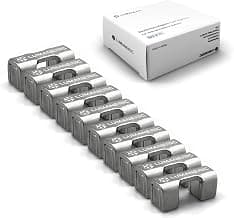
JOYROOM 9-Pack Magnetic Clips
Adjustable magnetic cable clips with strong adhesive for desk and wall mounting.
- Smooth cable adjustment
- 3M adhesive backing
- 9 clips included
These clips balance affordability with quality. At $1.04 per clip, they cost less than rotating or dual-slot competitors while using the same 3M VHB adhesive.
The adjustable groove is the key feature. You slide cables in and out without lifting the magnetic cover, which wears out faster on cheaper clips. Across 2,300+ reviews, users mention this feature specifically as lasting longer than competitors.
The 4mm max cable thickness handles USB-C, Lightning, and thin HDMI. The clips stick to wood, metal, plastic, and painted surfaces. Multiple reviewers confirm adhesive holding for 6+ months on desk edges and monitor backs.
Pros
- Strong 3M VHB adhesive
- Adjustable cable groove
- Works on all surfaces
- Best value per clip
Cons
- Won't fit thick braided cables
- Black only
- Magnet weakens over time
Best for standing desk legs: VIVO 14 in. Magnetic Channel
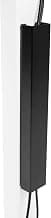
VIVO 14 in. Magnetic Channel
Steel magnetic cable channel for under-desk mounting with no-drill installation.
- 14 in. steel channel
- Holds 6-8 cables
- No adhesive needed
This steel channel attaches magnetically to metal desk legs and frames. No adhesive means fully repositionable and reusable. The 14-inch length holds 6-8 cables routed along a standing desk leg.
Reviews from standing desk owners confirm it stays in place during height adjustments. The magnetic grip is strong enough for vertical mounting but weak enough to remove and reposition by hand.
Critical limitation: only works on steel surfaces. If your desk legs are aluminum, wood, or plastic, this won't stick. You need adhesive-backed clips instead.
Pros
- No adhesive, fully removable
- Holds multiple cables
- Works on height-adjustable desks
- Durable steel build
Cons
- Only sticks to steel
- Expensive for one channel
- 14 in. may need extensions
Best budget magnetic clips: 10-Pack at $4.19
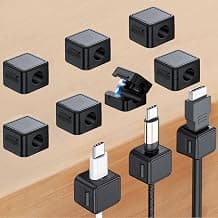
10-Pack Magnetic Cord Clips
Budget-friendly magnetic cable clips with adhesive backing for multiple surfaces.
- 42 cents per clip
- 10-pack value
- Works on smooth surfaces
At 42 cents per clip, these are the cheapest magnetic option with solid reviews. The catch is smaller size and weaker magnets compared to JOYROOM clips.
They work for thin cables (phone chargers, earbuds, mouse cables up to 3mm). The adhesive is weaker, too. Reviews mention these peeling off after 2-3 months versus 6+ for 3M-backed clips.
Good for low-stress applications like nightstand charging cables or securing a mouse cable to your desk edge. Not ideal for under-desk routing where cables pull on the clip or for thick cables.
Pros
- Lowest cost per clip
- 10-pack covers many spots
- Compact size
- Good for thin cables
Cons
- Weak adhesive vs 3M
- Magnets too weak for thick cables
- Quality inconsistent
Best for charging stations: Chfeila Rotating Clips
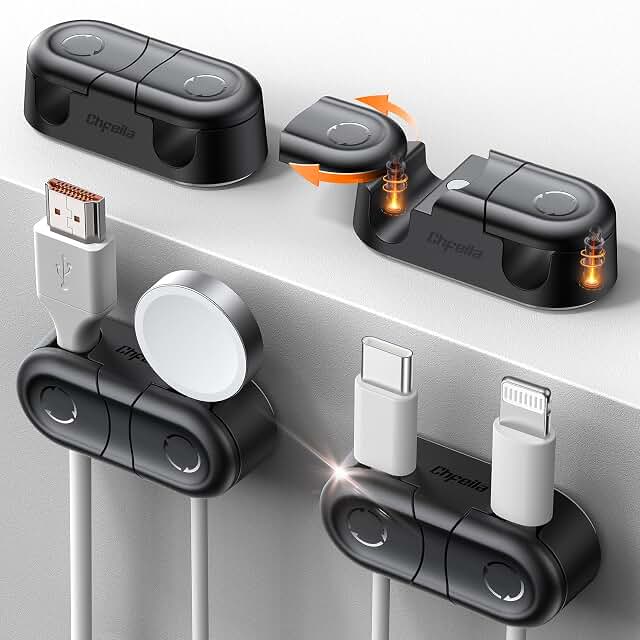
Chfeila 4-Pack Rotating Clips
Dual-slot magnetic clips with 360-degree rotation and twist-lock mechanism.
- Two cable slots
- 360-degree rotation
- Twist-lock mechanism
These clips hold two cables and rotate 360 degrees. Perfect for desk edge charging spots where you need to angle cables toward different devices (phone and watch, or laptop and tablet).
The twist-lock mechanism prevents cable slippage better than standard magnetic clips. You twist the top to lock cables in place, preventing them from sliding out when you disconnect devices.
At $3.25 per clip, they're the most expensive adhesive-backed option. Only worth it for high-use spots where the dual slots and rotation add real value.
Pros
- Two cables per clip
- Rotation adds flexibility
- Twist-lock prevents slippage
- Premium design
Cons
- Only 4 clips
- $3.25 per clip
- Bulkier than simple clips
Best for adjustable desks: VIVO Vertebrae Cable Snake
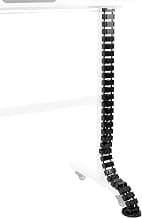
VIVO Vertebrae Cable Snake
Flexible magnetic spine organizer for standing desks with quad-entry design.
- Flexible spine
- 4 cable entry points
- Moves with desk
This flexible spine attaches magnetically to standing desk legs and bends as the desk moves. The quad-entry design routes monitor cables, power cords, and peripherals through one central channel that prevents cable strain during height changes.
Standing desk owners in reviews confirm it solves the cable sag problem that happens when you raise the desk. The spine flexes to maintain proper cable length and routing.
Expensive at $35, but it's the only solution designed specifically for moving desks with 4+ cables. The magnetic mounting works only on steel legs, limiting compatibility.
Pros
- Flexible design moves with desk
- Four cable entry points
- Prevents cable strain
- Strong magnetic mount
Cons
- $35 for one unit
- Only works on steel
- Overkill for fixed desks
Heavy-duty option: Neodymium Magnetic Clips
Heavy Duty Neodymium Clips
Reusable magnetic clips with powerful neodymium magnets, no adhesive required.
- Neodymium magnets
- No adhesive
- Holds 6mm cables
These pure-magnetic clips skip adhesive entirely. They stick directly to metal surfaces using powerful neodymium magnets. The benefit is full reusability and stronger cable grip (up to 6mm thick cables).
The 4.1-star rating reflects inconsistency. They work great on horizontal metal surfaces (desk underside, metal cable trays) but slip on vertical surfaces under cable tension. Some reviewers mention magnets too strong (hard to remove), others say too weak (slides down desk legs).
Use these for thick cables on horizontal metal surfaces. For vertical mounting or non-metal desks, adhesive-backed clips work better.
Pros
- No adhesive, fully reusable
- Handles thick cables to 6mm
- Strong neodymium magnets
- Good for metal surfaces
Cons
- Lowest rating (4.1 stars)
- Only works on metal
- Can slip on vertical mounts
- Bulky design
Adhesive-backed vs pure magnetic clips
Adhesive-backed magnetic clips (like JOYROOM, Chfeila, budget 10-pack):
- Work on any surface: wood, metal, plastic, painted walls
- Semi-permanent: adhesive creates strong bond, difficult to reposition
- Cable repositioning only: you can move cables, not the clip itself
- Best for: wood desks, monitor backs, walls, non-metal surfaces
Pure magnetic clips (like neodymium clips, VIVO channel):
- Only work on ferrous metals (steel desk legs, metal frames)
- Fully repositionable: move clips anywhere on metal surface
- No adhesive wear: reusable indefinitely
- Best for: steel standing desks, metal cable trays, file cabinets
Most desks need adhesive-backed clips since wood dominates desk construction. Pure magnetic clips only make sense if you have substantial steel components and want full flexibility.
Installation tips for maximum adhesive hold
Clean the surface: Wipe with isopropyl alcohol before applying adhesive-backed clips. Oil, dust, and moisture reduce bond strength by 40-60%.
Temperature matters: Apply when room temp is above 60°F. Cold prevents proper adhesive bonding. Let cure 24 hours before loading cables.
Plan placement first: Mark clip positions with tape before peeling adhesive. Once stuck, repositioning damages the bond. Measure cable paths and plan clip spacing (every 6-12 inches for desk edge routing).
One cable per clip: Don't overload. A clip rated for 4mm handles one 4mm cable, not two 2mm cables. Multiple cables exceed the magnetic strength and adhesive weight limits.
For best results on our standing desk cable management guide, we recommend pairing magnetic clips with cable sleeves and trays for complete routing.
Common problems and how to avoid them
Adhesive peeling within weeks: Usually caused by dirty surface, cold installation, or overloading. Clean with alcohol, apply in warm room, let cure 24 hours, and use one cable per clip.
Magnets too weak: Budget clips use ferrite magnets that work for thin cables only. For USB-C and HDMI, get 3M-backed clips like JOYROOM. For thick braided cables, get neodymium clips or channel organizers.
Clips sliding down vertical surfaces: Pure magnetic clips slide on vertical metal under cable tension. Use adhesive-backed clips for vertical mounting, even on metal surfaces.
Can't remove cables: Some magnetic clips require lifting the magnetic cover to insert cables, creating wear. Get clips with adjustable grooves (like JOYROOM) that let cables slide in and out.
Buying guide: what to look for
Adhesive type
3M VHB (Very High Bond) tape lasts years. Generic foam adhesive fails in weeks. Check product descriptions for "3M adhesive" or "VHB tape."
Magnet strength
Neodymium magnets are strongest but expensive. Ferrite magnets work for cables up to 4mm. Check max cable thickness in product specs.
Clip design
- Single-slot: holds one cable, most common
- Dual-slot: holds two cables, good for charging stations
- Rotating: adds angle adjustment for desk edges
- Channel: holds multiple cables along a path
Cable compatibility
Most clips fit USB-C, Lightning, and thin HDMI (3-4mm). For ethernet, braided cables, or power cords (5-6mm+), get heavy-duty clips or channels.
Surface compatibility
Adhesive-backed clips work on wood, metal, plastic, and painted surfaces. Pure magnetic clips only work on ferrous metals (steel, iron). Match clip type to your desk material.
JOYROOM 9-Pack Magnetic Clips
At $9.33 for 9 clips with 3M adhesive and adjustable grooves, the JOYROOM clips offer the best balance of quality and value. They work on all desk types and handle the most common cable sizes without the bulk or cost of premium rotating clips.
Check Price on AmazonFrequently asked questions
Do magnetic cable clips damage desk finishes? The magnets don't damage surfaces, but 3M VHB adhesive creates a very strong bond. Removing clips can pull off paint or wood finish. Test in a hidden spot first if you're concerned about damage.
Can I reuse magnetic clips? Pure magnetic clips (no adhesive) are fully reusable. Adhesive-backed clips lose bond strength when removed and can't be effectively restuck.
What cable sizes fit magnetic clips? Most clips handle 3-4mm cables (USB-C, Lightning, thin HDMI). Heavy-duty neodymium clips or channels handle up to 6mm (ethernet, braided cables, bundled cords).
Will magnets interfere with electronics? The small magnets in cable clips don't affect phones, laptops, or monitors. Keep away from magnetic storage media (rare in 2026) and pacemakers.
How many clips do I need per cable? For horizontal desk edge routing: one clip every 6-8 inches. For vertical runs (monitor back, desk leg): one clip every 4-6 inches to prevent sagging.
Do magnetic clips work on aluminum desks? Adhesive-backed clips work on aluminum (the adhesive sticks). Pure magnetic clips don't work on aluminum since it's non-ferrous. Check if your desk frame is steel or aluminum before buying pure magnetic products.
Jamie Chen
AuthorFull-time remote software developer since 2019. Runs a 3-monitor standing desk setup and has tried dozens of cable management solutions firsthand. Writes from the perspective of someone who actually works at their desk 8+ hours daily.
Related Articles
Adhesive Desk Cable Clips 2026: 5 No-Drill Picks for Clean Cord Routing
Five adhesive cable clips compared for desk and wall cord management. We rated each on adhesive strength, clip count, durability, and price per clip.
Best Adhesive Cable Clips for Desks (2026): 7 Tested, 3 Worth Buying
We tested 7 adhesive cable clips for desks, walls, and standing-desk setups. Our 3 winners for 2026 — plus the duds to avoid.
Best Under Desk Power Strip Mounts 2026: 5 Picks for Clean Outlet Setup
We tested 5 under-desk power strip mounts for hidden, organized outlets. Comparison of clamp, adhesive, and screw-in styles with safety ratings.