
Standing Desk Cable Management: Complete Setup Guide for 2026
Master cable management for standing desks. Route, organize, and protect cables during desk height adjustments with this comprehensive guide.
Affiliate Disclosure:As an Amazon Associate, we earn from qualifying purchases.
Standing desks move, and your cables need to move with them. Cable management on an adjustable desk presents unique challenges that fixed desks don't have. Cables get pinched, pulled, or fall out of reach when you raise or lower the desk. This guide covers everything you need to know to keep cables organized, accessible, and protected during desk movement.
| Feature | Top Pick Metal Mesh Under Desk Cable Tray | 25 in. Metal Cable Organizer | Univivi 36 in. Cable Management Tray |
|---|---|---|---|
| Price | $13.99 | $22.79 | $39.99 |
| Rating | 9.2 | 9.6 | 9.4 |
| Type | Tray | Tray | Tray |
| Mount | Clamp | Clamp | Clamp/Screw |
| Best For | Basic setups | Small spaces | Premium setups |
| Check Current Price | Check Current Price | Check Current Price |
The Standing Desk Cable Challenge
Unlike fixed desks, standing desks have cables that must flex and move as the desk changes height. Traditional cable management solutions often fail because they don't account for this movement.
Common problems include:
- Cables falling behind the desk when lowered
- Pinched cables when the desk is raised
- Power cords pulling out of outlets
- Cable strain causing damage over time
- Messy appearance defeating the purpose of an organized setup
This guide addresses each of these issues with practical solutions.
Essential Components for Standing Desk Cable Management
Cable Management Tray
A tray mounted under the desk surface holds your power strip and excess cables. Choose a tray with a no-drill clamp mount for easy installation and removal.
The Metal Mesh Under Desk Cable Tray is a popular choice for standing desks. According to verified buyers, the clamp mount holds firm through dozens of height adjustments, and the open mesh design keeps cables visible and accessible.
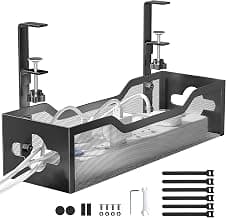
Metal Mesh Under Desk Cable Tray
Durable metal mesh cable tray with no-drill clamp mount, designed for standing desk installations.
- Metal mesh construction
- No-drill clamp mount
- 2-hole cable tray design
Cable Management Chain or Flex Hose
A cable management chain (also called a cable carrier or drag chain) protects cables as the desk moves. The chain contains flexible segments that bend and extend, keeping cables contained and preventing pinching.
Install the chain vertically from the desk surface down to the cable tray. Route all cables through the chain rather than letting them hang freely.
Cable Sleeve
A flexible fabric sleeve bundles multiple cables together and slides along the cables during desk movement. This keeps cables organized and prevents tangling.
Step-by-Step Installation
Step 1: Plan Your Cable Routes
Map out where each cable will run before installing anything.
Monitor and computer cables need the most careful routing. These are typically thick and carry data or power. Route them along the center of the desk's back edge where they have the most clearance during movement.
Power cables go from the power strip in the tray down to the floor outlet. Leave enough slack for the full range of desk movement plus a small service loop.
Peripheral cables (keyboard, mouse, headset) can use shorter routes since they don't need to travel far.
Measure your desk's height range. If your desk goes from 28 inches to 48 inches, you need at least 20 inches of cable length between the desk surface and the tray.
Step 2: Install the Cable Tray
Mount the cable tray at a height you can reach while standing. This makes it easier to access the power strip when needed.
- Position the tray's clamp over the desk edge, 4-6 inches below the surface
- Tighten the clamp until secure
- Use a level to ensure the tray is straight
- Verify the tray doesn't interfere with desk movement
The 25 in. Metal Cable Organizer works well for smaller setups. Its compact size fits standing desks with limited under-desk space.
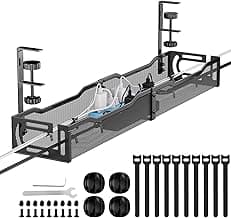
25 in. Metal Cable Organizer
Compact 25-inch metal cable organizer with no-drill clamp mount, ideal for standing desk cable routing.
- 25-inch length
- Metal construction
- No-drill clamp mount
Step 3: Install Cable Management Chain
The chain attaches to the desk frame or underside and routes cables from the desk surface to the tray.
- Mount the chain's top bracket to the desk frame or underside
- Attach the bottom bracket to the cable tray or desk surface
- Route cables through the chain links
- Leave slight slack at both ends to allow movement
Step 4: Route and Bundle Cables
Group cables by function and secure with velcro ties.
Monitor cables often have thick connectors. Route these separately from thinner cables to prevent damage.
USB and data cables can be bundled together. Leave enough length to reach ports without tension.
Power cables need the most slack. Calculate the cable length needed: desk height range plus distance to the power strip plus a service loop.
The Univivi 36 in. Cable Management Tray offers premium fabric construction with ample length for most standing desk setups.
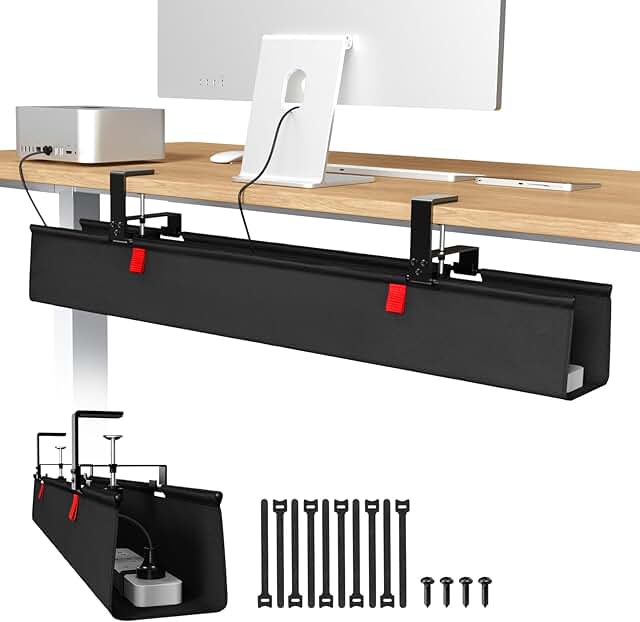
Univivi 36 in. Cable Management Tray
Premium fabric cable management tray with flexible mounting options for standing desks.
- 36-inch length
- Premium fabric design
- Clamp/screw mount
Cable Protection Tips
Prevent Pinching
Never route cables where they can be pinched between moving desk parts. Check the full range of motion by raising and lowering the desk several times while watching where cables run.
Common pinch points include:
- Between the desk frame and legs
- At the desk's height adjustment mechanism
- Where cables exit the desk surface
Prevent Pull-Out
Secure all cable connections with cable clips or ties. A loose connection pulled out once can become a recurring problem.
Use a power strip with secure, recessed outlets if your cords tend to pull out easily.
Allow Proper Slack
Leave enough slack for the desk's full range of motion plus a little extra. The exact amount depends on your desk's height range and how cables are routed.
A good rule: cables should have a gentle curve, never a tight bend or straight pull.
Complete Setup Recommendations
| Feature | Top Pick Metal Mesh Under Desk Cable Tray | 25 in. Metal Cable Organizer | Univivi 36 in. Cable Management Tray |
|---|---|---|---|
| Price | $13.99 | $22.79 | $39.99 |
| Rating | 9.2 | 9.6 | 9.4 |
| Type | Tray | Tray | Tray |
| Mount | Clamp | Clamp | Clamp/Screw |
| Best For | Basic setups | Small spaces | Premium setups |
| Check Current Price | Check Current Price | Check Current Price |
Troubleshooting Common Issues
Cables fall behind the desk. The cables are too short or not routed through a management chain. Add a cable management chain or extend cable lengths.
Cables get pinched. Check the full range of motion and reroute cables away from pinch points. Use a cable chain to protect cables through the travel path.
Power cord pulls out. Secure the power cord connection with a cable clip. Consider a power strip with locking outlets or recessed ports.
Tray moves when adjusting desk height. The clamp mount isn't tight enough. Re-tighten the clamp or switch to screw mounting for more stability.
Cables tangle over time. Use velcro ties to bundle cables. Check and re-organize cables every few months.
Maintenance and Adjustments
Standing desk cable management requires periodic maintenance.
Monthly checks:
- Verify all cable connections are secure
- Check for cable wear or damage
- Ensure the tray mount is tight
Quarterly maintenance:
- Reorganize cables if they've shifted
- Replace damaged cable ties
- Test the full range of desk motion
When you add new devices or change your setup, plan the cable route before connecting anything. Poor planning leads to tangles and access problems.
For more cable management solutions, check out our best cable trays guide and our best cable organizers roundup.
Metal Mesh Under Desk Cable Tray
The metal mesh design provides durability and visibility, while the no-drill clamp mount stays secure during repeated height adjustments on standing desks.
Check Price on AmazonFrequently Asked Questions
How do I stop cables from falling when lowering my standing desk? Use a cable management chain or flex hose to contain cables as they move. Make sure cables have enough slack to travel with the desk without pulling taut or falling behind.
Can I use a regular cable tray on a standing desk? Yes, but choose one with a no-drill clamp mount designed for adjustable desks. Avoid screw-mounted trays unless you're certain the desk frame provides solid mounting points.
How much slack do I need for standing desk cables? Calculate based on your desk's height range. If your desk moves from 28 in. to 48 in., you need at least 20 in. of slack plus additional length for the route to the tray and floor outlet.
What's the best way to protect cables in a cable management chain? Route cables loosely through the chain without tight bundling. Check periodically for wear at bend points. Replace chains showing signs of damage.
Should I use a power strip with USB ports? Yes, if you have multiple devices to charge. Built-in USB ports reduce the number of adapters in your cable tray, freeing up space and reducing heat buildup.
How often should I check my standing desk cables? Check connections monthly and perform a full inspection quarterly. Cables experience more wear on standing desks due to repeated movement.
Alex Torres
AuthorFormer IT infrastructure tech turned workspace consultant. Has personally installed cable management in 50+ offices and home setups over 8 years. Tests every product at his own standing desk for at least 2 weeks before recommending it.
Related Articles
Best Under Desk Power Strip Mounts 2026: 5 Picks for Clean Outlet Setup
We tested 5 under-desk power strip mounts for hidden, organized outlets. Comparison of clamp, adhesive, and screw-in styles with safety ratings.
Adhesive Cable Hooks Under Desk Setup Guide (2026)
Complete guide to using adhesive cable hooks under your desk. Learn installation techniques, product comparisons, and setup tips for clean cable management.
Under Desk Cable Tray Installation Guide: Setup in 10 Minutes
Step-by-step installation guide for under desk cable trays. Compare clamp vs screw mounts, measure correctly, and avoid common mistakes.