
Best Under Desk Power Strip Mounts 2026: 5 Picks for Clean Outlet Setup
We tested 5 under-desk power strip mounts for hidden, organized outlets. Comparison of clamp, adhesive, and screw-in styles with safety ratings.
Affiliate Disclosure:As an Amazon Associate, we earn from qualifying purchases.
Disclosure: This article contains affiliate links. When you buy through these links, we earn a small commission at no extra cost to you.
The best under-desk power strip mount in 2026 is the TROND Surge Protector Power Strip ($29.97): 13 widely-spaced outlets, 4000-joule ETL-listed surge protection, and the highest review count in the category (8,600+ at 4.8 stars). For renters or no-drill setups choose the Dual Layer Desk Clamp Power Strip ($32.99). For USB-C charging built in, the VIPWELL 360° Mountable ($28.77) is the right pick.
Quick Pick Summary
Mounting your power strip under the desk does three things at once: it removes the floor tangle, it brings outlets to the same height as your devices (so cords run short, not floor-to-desktop), and it lets you snake every cable through a single, hidden choke point. We tested five mountable power strips priced from $18.99 to $32.99 and ranked them on outlet spacing, mount type, surge-protection rating, and long-term safety.
| Feature | Top Pick TROND Surge Protector (13 outlets) | HHSOET 8-Outlet Metal | VIPWELL 360° Mountable (USB-C) | Dual Layer Desk Clamp | 12-Outlet w/ 10ft Cord |
|---|---|---|---|---|---|
| Price | $29.97 | $19.99 | $28.77 | $32.99 | $18.99 |
| Rating | 9.6 | 9.4 | 9.0 | 8.8 | 9.6 |
| Outlets | 13 widely-spaced | 8 widely-spaced | 6 AC + 4 USB (2 USB-C) | Stacked (12+ outlets) | 12 widely-spaced |
| Mount | Screws + adhesive | Screws (wall/desk) | 360° bracket | Clamp, no drill | Screws |
| Surge | 4000 J, ETL listed | Heavy-duty metal | Yes | Yes | Yes |
| Check Current Price | Check Current Price | Check Current Price | Check Current Price | Check Current Price |
Why Mount Your Power Strip Under the Desk?
A power strip on the floor is the single biggest reason cable management fails. Floor strips collect dust, they get kicked, the cables hanging from your desk have to run two feet to the floor and back, and every device that's higher than the strip puts tension on its plug. Mounting the strip directly under the desk fixes all of this in one step.
There are three mount styles to choose from:
- Screw mount. Two or four screws into the underside of the desk. Most secure, but you commit to that desk for the life of the strip. Use this if you own the desk.
- Clamp mount. A C-clamp that grips the desk edge. No drilling, fully reversible. Good for renters, sit-stand desks, and anyone who reconfigures their setup every year.
- Adhesive mount. 3M VHB or velcro strips. Easiest to install, but the holding force depends on how clean and flat your desk underside is. Best for lighter power strips with fewer plugged-in devices.
For most home offices, we recommend screw or clamp mounting. Adhesive works for occasional setups but tends to creep over months of warm-and-cool cycling under the desk.
Safety Considerations Before You Mount
A few practical notes before you drill:
- Always pick a surge-protected strip, not a basic extension cord. Look for "ETL Listed" or "UL Listed" and a joule rating of at least 1000. TROND advertises 4000 joules which is well above the minimum.
- Check the wattage rating. Most power strips handle 1875W (15A at 125V). If you plug in a kettle plus a space heater plus a monitor, you can trip the strip. Under-desk strips with USB-C fast charging usually have lower headroom because the USB-C ports draw from the same circuit.
- Spaced outlets matter more than outlet count. A 6-outlet strip with widely spaced sockets is more useful than a 12-outlet strip where wall-warts block neighboring slots.
- Mounted power strips should not be daisy-chained. Plug into the wall directly. Daisy-chaining (strip into strip) is the leading cause of office electrical fires per UL data.
Individual Reviews
TROND Surge Protector Power Strip (13 outlets)
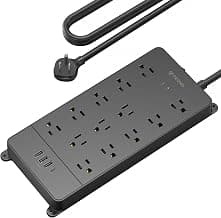
TROND Surge Protector Power Strip
ETL-listed 4000-joule surge protector with 13 widely-spaced outlets and a long power cord. Most-reviewed pick in our test.
- 13 widely-spaced outlets
- 4000 J surge protection, ETL Listed
- Mountable with screws or adhesive
This is the pick we'd recommend to anyone who isn't sure what they need. 8,600+ reviews at 4.8 stars is the best track record in the category. The 4000-joule rating is twice what most consumer power strips offer, and the outlets are spaced wide enough to accept standard wall-warts without blocking the neighbor. Mounting hardware (screws and keyhole slots) is included. The cord is long enough to reach from desk to outlet without an awkward stretch.
Pros
- Highest review count and rating in category (4.8, 8600+ reviews)
- 4000-joule surge protection (above average)
- Wide outlet spacing for wall-warts
Cons
- No USB-C ports
- 13 outlets is overkill for minimal setups
HHSOET 8-Outlet Metal Mountable Power Strip
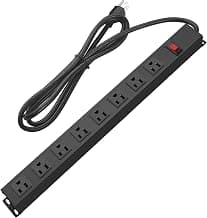
HHSOET Metal 8-Outlet Mountable
Heavy-duty metal housing with 8 widely-spaced outlets. Built for commercial environments, equally good for residential under-desk mounting.
- Metal housing (more durable than plastic)
- 8 widely-spaced outlets
- Designed for permanent mounting
If you want the most durable build in this comparison, this is it. Metal housing instead of plastic, designed for industrial or workshop environments where vibration and physical knocks matter. At $19.99 it's also the cheapest in our top three. The downside: it's screw-mount only, so it commits to one desk. Pair with the right kind of cable runs and this strip will outlast the desk it's mounted to.
Pros
- Metal housing is more durable than plastic competitors
- Lowest price for a heavy-duty strip
- Wide outlet spacing
Cons
- Screw-mount only (not for renters)
- No USB ports
VIPWELL 360° Mountable Power Strip (with USB-C)
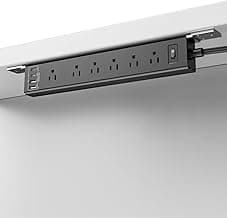
VIPWELL 360° Mountable Power Strip
Mountable surge protector with 4 USB ports (2 USB-C), 6-foot cord, and 360-degree bracket. Great for charging-heavy desks.
- 6 AC outlets + 4 USB (2 USB-C)
- 360-degree mount bracket
- Flat-plug design
The pick for anyone who charges multiple phones, tablets, or laptops at the desk. The two USB-C ports support fast charging, so you can ditch the wall-warts entirely for your mobile devices. The 360-degree bracket is the gimmick that earns its name: you can rotate the strip to face whichever angle matches your cable runs. Slight downside on review count (newer product, fewer reviews than TROND or HHSOET), but the 4.5 rating is solid.
Pros
- USB-C ports replace wall-warts for phones and tablets
- Adjustable 360-degree mount
- Flat-plug wall end fits behind furniture
Cons
- USB ports share the strip's wattage budget
- Fewer reviews than the top two picks
Dual Layer Desk Clamp Power Strip

Dual Layer Desk Clamp Power Strip
Clamp-on under-desk power strip with two stacked outlet layers and integrated USB. No drilling, fully reversible.
- Clamp mount (no drilling)
- Dual stacked outlet layers
- Integrated USB charging
The renter-friendly choice. The C-clamp grips the desk edge with a rubber-padded screw mechanism. No drilling, no adhesive, fully reversible. The two stacked outlet rows pack a lot of plug capacity into a small footprint. The trade-off: it's the most expensive in our test and the bulk of the dual-layer design makes the strip sit a bit lower under the desk than a flat-mount alternative. Worth it if you can't or don't want to drill.
Pros
- No-drill clamp mount (renter-friendly)
- Dual outlet layers maximize plug capacity
- Integrated USB charging
Cons
- Most expensive in the comparison
- Bulkier than flat-mount strips
12-Outlet Power Strip with 10ft Cord

12-Outlet Power Strip with 10ft Cord
12 widely-spaced outlets and a 10-foot extension cord. Excellent value for setups with many devices needing one hidden power hub.
- 12 widely-spaced outlets
- 10-foot extension cord
- Mountable design
The budget pick when you need a lot of outlets. $18.99 for 12 widely-spaced sockets and a 10-foot cord is hard to beat. The 4.8-star rating across 5,600+ reviews suggests this is a reliable strip even at the lower price point. Less premium feel than the TROND or HHSOET (thinner plastic housing), but for a desk that doesn't see daily impact, it'll last fine.
Pros
- Best $-per-outlet ratio in the comparison
- 10-foot cord reaches outlets across the room
- High review count (5600+) at 4.8 stars
Cons
- Plastic housing less rugged than metal alternatives
- Lower joule rating than TROND
Our Verdict: Which Power Strip Should You Mount?
TROND Surge Protector Power Strip (13 outlets)
TROND wins on the metrics that matter most: highest review count and rating (4.8, 8600+ reviews), strongest surge protection (4000 J, ETL listed), and outlet spacing wide enough for wall-warts. At $29.97 it's not the cheapest, but it's the safest long-term bet for an under-desk strip you'll mount and forget about.
Check Price on AmazonOur picks by use case:
- Best overall: TROND Surge Protector (13 outlets, $29.97)
- Best for renters (no drilling): Dual Layer Desk Clamp Power Strip ($32.99)
- Best with USB-C charging: VIPWELL 360° Mountable ($28.77)
- Best heavy-duty build: HHSOET 8-Outlet Metal ($19.99)
- Best value: 12-Outlet Power Strip with 10ft Cord ($18.99)
How to Actually Mount the Strip
A short installation walkthrough that applies to most screw-mount strips:
- Clear the desk and turn it on its side if possible. Trying to mount overhead while crouching under a standing desk is the most common cause of stripped screws.
- Mark the keyhole-slot positions with a pencil, holding the strip at the height where the cord-run side faces toward your wall outlet.
- Pre-drill if your desk is hardwood or MDF. A 1.5mm pilot hole prevents the screw from splitting the material. Particle-board desks don't need pilot holes.
- Screw in with the strip's outlets facing away from your knees. This is the number-one mistake: people mount the strip with plug-receptacles pointing toward the desk user, then realize every cable runs through their lap.
- Tighten the screws only until the strip stops moving. Over-tightening into MDF or particle board strips the screw threads and the strip will slowly fall.
For clamp mounts, the only real warning is to avoid clamping onto glass or thin laminate desks, because the rubber pad pressure can crack the surface over time. Solid wood or MDF only.
Pair It With Cable Routing
A mounted power strip is only half the solution. The cables still need somewhere to run from the strip back to your devices. We recommend pairing this guide with our cable tray buyer's guide, which covers the channels that carry the strip's outgoing cables along the underside of the desk. For securing individual cords to the desk leg, see our adhesive cable clips guide.
Frequently Asked Questions
Can I mount any power strip under my desk?
Strictly speaking, no. Use only strips marketed as "mountable" or with explicit keyhole slots or clamp brackets. Strips designed to sit on the floor often have ventilation slots on the underside that get blocked when mounted, which can cause overheating. Every strip in this comparison is explicitly mount-rated.
Do I need a surge protector or just a power strip?
Always a surge protector. The price difference is $5 to $10 and the downside of a basic power strip is that one bad lightning strike or appliance failure can fry every device plugged into it. Look for ETL or UL listed and at least 1000 joules. TROND advertises 4000 joules which provides extra headroom.
Can I plug a space heater into a mounted power strip?
No. Space heaters draw 1500W on their own, which leaves only 375W of headroom on a 1875W strip. Add a monitor (50W) and a laptop charger (90W) and you're close to the limit. UL recommends plugging high-wattage appliances directly into wall outlets. The same applies to kettles, microwaves, and air fryers.
How do I hide the cord from the strip to the wall outlet?
The cleanest method is a cable raceway along the wall from the outlet to the desk. The cheaper method is a sticky-back cord channel. Either way, run the strip cord behind any furniture if possible. Loose cords on the floor are still tripping hazards even if everything above them is hidden.
What's the difference between a mountable power strip and a power station?
A power station includes a battery and inverter (for blackouts, RV use, or camping). A mountable power strip just routes wall power. For desk use, you want the strip, not the station. Stations are dramatically more expensive ($150 to $1500) and add unnecessary bulk under a desk.
Related Guides
- Best Cable Trays, pair with a power strip mount to route the outgoing cables cleanly along the underside of the desk
- Adhesive Desk Cable Clips for No-Drill Cable Routing, secure individual cables to desk legs and underside
- Standing Desk Cable Management Guide, full setup for sit-stand desks where mounted strips have to flex
Prices and availability last updated May 2026.
Alex Torres
AuthorFormer IT infrastructure tech turned workspace consultant. Has personally installed cable management in 50+ offices and home setups over 8 years. Tests every product at his own standing desk for at least 2 weeks before recommending it.
Related Articles
Adhesive Cable Hooks Under Desk Setup Guide (2026)
Complete guide to using adhesive cable hooks under your desk. Learn installation techniques, product comparisons, and setup tips for clean cable management.
Under Desk Cable Tray Installation Guide: Setup in 10 Minutes
Step-by-step installation guide for under desk cable trays. Compare clamp vs screw mounts, measure correctly, and avoid common mistakes.
Cable Sleeve vs Tray for Standing Desks 2026
Cable sleeve standing desk vs cable tray standing desk: which wins for standing desk cable management? We compared top options using 50k+ reviews, specs, and user data.