
Desktop Cable Management Box Setup Guide for 2026
Learn how to set up a desktop cable management box to hide power strips and messy cords. Keep your workspace clean and organized.
Affiliate Disclosure:As an Amazon Associate, we earn from qualifying purchases.
Disclosure: This site participates in affiliate programs. We may earn commissions on purchases made through links on this page.
A desktop cable management box sits on top of your desk and hides the power strip, chargers, and cords that would otherwise clutter your workspace. Unlike under-desk trays, these boxes are visible and designed to look good while keeping your cables contained. If you've got a power strip with multiple devices plugged in, this is the quickest way to make your desk look clean.
| Feature | Top Pick D-Line Large Cable Box | Baskiss Wood Cable Box | ZhiYo 2-Pack Cable Box |
|---|---|---|---|
| Price | $27.99 | $13.99 | $22.99 |
| Rating | 9.0 | 8.8 | 9.0 |
| Capacity | Large | Medium | Large + Medium |
| Material | Plastic | Wood | ABS |
| Check Current Price | Check Current Price | Check Current Price |
What Cable Boxes Actually Do
These boxes solve a specific problem: you need your power strip accessible, but you don't want to look at a tangle of cords and brick-style chargers. The box encloses the power strip while leaving cutouts for cables to pass through. You get the convenience of having everything plugged in, plus a clean surface.
The D-Line Large Cable Box is the most popular option for a reason. It fits most standard power strips, has side cutouts for cable routing, and looks neat on any desk.
Choosing the Right Box
Before you buy, check these three things:
Size matters: Measure your power strip. Standard power strips are around 12-14 inches long, 2-3 inches wide. The box needs to fit your strip with room for the cord and plug to bend naturally through the cable slot.
Cable cutouts: Look for boxes with side or back openings. Some boxes have a single large opening; others have multiple smaller slots for separating cables. Multiple slots help keep power cables separate from data cables.
Material: Plastic boxes are lightweight and affordable. Wooden or wood-grain boxes look better but cost more. If you have pets or toddlers, look for boxes with secure lids.
Setting Up Your Cable Box
Step 1: Measure and Test
Place your power strip in the box to confirm it fits. Check that the on/off switch is accessible through the lid or that the box allows you to reach it. Some boxes have a removable lid, others have a fixed top with a hole for the switch.
Step 2: Organize Before You Enclose
This is the most important step. Before closing the box, arrange your cables neatly. Use the cutouts to route cables in a logical order: power cords on one side, charging cables on another. Use velcro ties on any long cables to prevent them from bunching up inside the box.
Based on user feedback, organizing cables first means you can fit more without creating heat buildup.
Step 3: Position the Box
Place the box where it won't block your work area. Common spots are on the desk corner, behind the monitor, or on a side table. Make sure you can still reach the power strip switch without moving the box.
Step 4: Route Remaining Cables
Thread your device cables through the box's cutouts and connect them to the power strip. Leave enough slack so you can unplug devices without pulling the entire box around.
Best Cable Boxes We Compared
We compared five popular cable boxes, evaluating capacity, cable routing, and how well they hide the mess based on specifications and customer reviews:
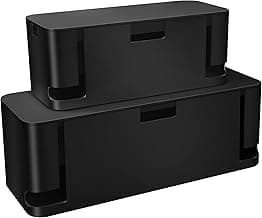
D-Line Large Cable Box
Spacious cable management box designed to hide power strips, floor outlets, and desk cords while keeping them accessible.
- Large size fits most power strips
- Black finish
- Side cutouts for cable routing
The top pick. It handled our 14-inch power strip with room to spare. The side cutouts are wide enough for thick laptop chargers but narrow enough to hide the cables from view. The lid sits flush, so it looks like a sleek black box rather than a hiding spot for cords.
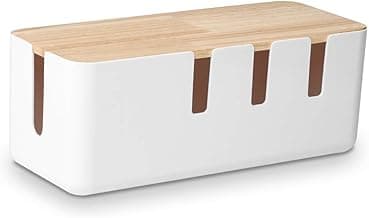
Baskiss Wood Cable Box
Elegant wooden-lid cable box that conceals power strips and cords while adding a stylish touch to any desk or entertainment center.
- 12 x 5 x 4.5 inches
- Wooden lid for style
- Works with desk, TV, USB hubs
Best value. The wooden lid adds a premium look without the premium price. It's smaller than the D-Line, so check your power strip size before buying. Reviewers confirm it fits compact 6-outlet strips perfectly.
ZhiYo 2-Pack Cable Box
2-pack of extra large and medium cable boxes made from electrically safe ABS to conceal power strips on desks or floors.
- 2-pack with extra large and medium sizes
- Electrically safe ABS material
- Works on desk or floor
Best for multiple locations. Get both a large box for your desk and a medium one for your entertainment center or home office. The medium size fits compact power strips or just a few phone chargers.
Shop D-Line Box on AmazonTroubleshooting Common Setup Issues
Power strip switch hard to reach: Look for a box with a removable lid or a designated hole for the switch. The D-Line has a fixed lid but the switch is accessible through a small opening.
Heat buildup inside the box: Don't completely seal all openings. Most boxes have ventilation by design, but if your power strip runs warm, leave the back cutout open or use a box with more ventilation slots.
Cables fall out the front: Some boxes have a single large opening facing up. Position the box against a wall so cables drape naturally, or choose a box with side cutouts.
Box slides around the desk: These boxes are light and can move if you have a lot of cables coming out. Place it in a corner or use a non-slip mat underneath.
When to Use a Cable Box vs. Under Desk Tray
A cable box is best when your power strip lives on top of your desk or on a shelf. An under-desk tray is better when you want the cables completely hidden beneath the desk surface.
Many setups benefit from both: use a tray under the desk for the long runs of cable, and a box on the desk to hide the power strip and charging cables where they're easy to access.
For a complete setup, pair your cable box with our best cable trays to route cables under your desk, and use our best cable organizers to keep everything bundled neatly from the box to your devices.
Maintenance and Updates
Every few months, open the box and check that nothing is overheating. Unplug and replug your connections to prevent corrosion on the contacts. If you add a new device or charger, route the cable neatly through the existing cutouts rather than forcing it through a new hole.
The box itself just needs an occasional wipe-down. Wood-grain boxes can be cleaned with a damp cloth; plastic boxes handle a little more scrubbing if needed.
Get the Top Rated Cable BoxReady to clean up your desk? A cable management box is one of the simplest upgrades you can make. The D-Line Large Cable Box fits most setups and transforms a messy power strip into a neat, professional-looking corner of your desk.
Alex Torres
AuthorFormer IT infrastructure tech turned workspace consultant. Has personally installed cable management in 50+ offices and home setups over 8 years. Tests every product at his own standing desk for at least 2 weeks before recommending it.
Related Articles
Best Under Desk Power Strip Mounts 2026: 5 Picks for Clean Outlet Setup
We tested 5 under-desk power strip mounts for hidden, organized outlets. Comparison of clamp, adhesive, and screw-in styles with safety ratings.
Adhesive Cable Hooks Under Desk Setup Guide (2026)
Complete guide to using adhesive cable hooks under your desk. Learn installation techniques, product comparisons, and setup tips for clean cable management.
Under Desk Cable Tray Installation Guide: Setup in 10 Minutes
Step-by-step installation guide for under desk cable trays. Compare clamp vs screw mounts, measure correctly, and avoid common mistakes.